
The Hemingway Editor helps you identify complicated sentences, passive constructions, unnecessary words, and other writing habits that can make your text harder to read. But is it enough to improve your writing? Or will you still need other editing tools?
In this Hemingway Editor review, I’ll walk you through the tool’s main features, show you how to use them, explain the differences between its free and paid versions, and discuss where its suggestions can fall short.
I’ll also compare Hemingway with alternative writing tools, so you can better decide whether it’s worth adding to your workflow or not.
Now, let’s get started!
Is Hemingway Editor Worth Using? — Quick Answer
Yes, Hemingway Editor is worth using if you want to make your writing clearer, more concise, and easier to read. Its free version highlights difficult sentences, passive voice, adverbs, and wording that could be simplified. However, it doesn’t replace comprehensive proofreading, and its suggestions aren’t always appropriate. The paid version is worth considering if you need AI rewriting and advanced grammar corrections.
Hemingway Editor — A Brief Overview

The Hemingway Editor is a writing and editing tool that has been designed to make prose clearer and easier to follow. It analyzes your text for readability and highlights issues like these:
- Difficult sentences
- Passive voice
- Adverbs
- Words that have simpler alternatives
So, rather than treating every sentence as a grammar problem, Hemingway draws attention to wording and sentence structures that may slow readers down. And for this exact reason, its main purpose is to help you express ideas more directly.
For example, consider this sentence:
“Due to the fact that the weather conditions were unfavorable, the event was postponed by the organizers.”
Here is how Hemingway has highlighted it:
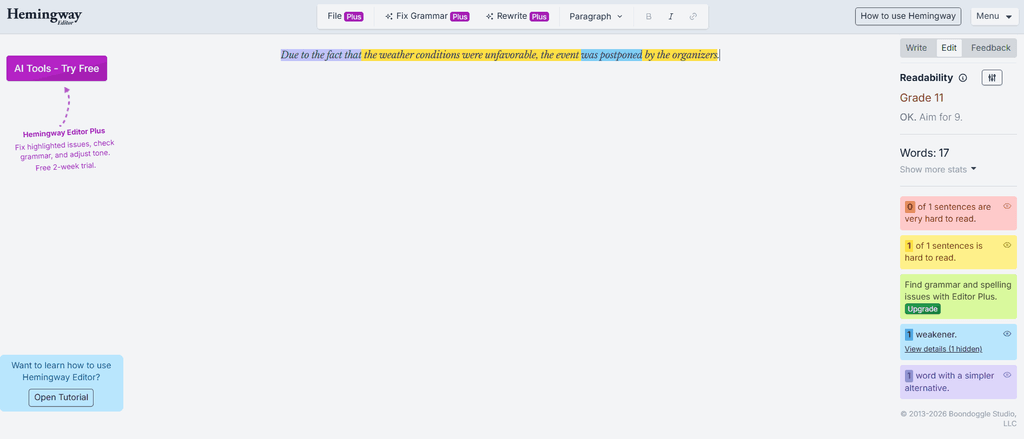
So, that’s how Hemingway highlights issues. And if you implement its suggestions here, specifically in the case of the picture shown above, it can make your writing concise.
However, shorter writing isn’t always better because the goal is to communicate clearly, not to remove every complicated word or long sentence.
Which Hemingway Editor App Should You Use?
Before exploring the features, it’s important to differentiate between the available versions of Hemingway Editor, as it has three different variants:
| Version | Main Purpose | Price |
| Online Editor | Readability analysis and writing-style highlights | Free |
| Hemingway Editor 3 | Desktop editing, offline use, and document formatting | $19.99 one-time |
| Editor Plus INDIVIDUAL 5K and 10K PLAN, TEAM 10K PLAN, and ENTERPRISE PLAN | AI-assisted rewriting, advanced grammar corrections, and document feedback | Varies according to the subscribed model |
But to be honest, the free online editor is a sensible starting point, especially if you want to identify difficult sentences without paying for additional features.
As far as the ‘Hemingway Editor 3’ is concerned, it’s a standalone desktop application for Mac and Windows systems. So, it supports offline:
- Editing
- Formatting
- Importing and exporting documents
It also supports publishing to WordPress. However, it doesn’t include the newer AI features.
The ‘Hemingway Editor Plus’ is the paid online option. It adds:
- Advanced grammar corrections
- Adjustments to length and tone
- AI-powered rewriting
- Document-level feedback
So, if you want these things, you can go with this version.
Hemingway Editor Features: What Does It Actually Do?
Now that you have a basic understanding of Hemingway Editor and its different versions, let’s look at the main features. And more importantly, let’s see how you can use them when editing your own writing.
1) Identifies Hard-to-Read Sentences
One of Hemingway’s most recognizable features is its color-coded readability feedback. For instance, in the current editor,
- Yellow highlights identify sentences that are hard to read
- Red highlights identify more complicated sentences
The exact feedback available can depend on which version you’re using and your selected readability target.
Consider the example of the following text block that we’ve used:
“Although the company had received several complaints about its customer service, it continued to use the same process, which resulted in further delays and increased customer frustration.”
Here is how Hemingway Editor has provided feedback on it:
Keep in mind that I haven’t changed any settings in the tool yet. But anyway, when I rewrote it, I got the following feedback from Hemingway:
See? The revision has a slight improvement because the revised version has separated the ideas and made the sequence of events easier to follow.
But when I review a highlighted sentence, I don’t automatically rewrite it. I first consider whether the sentence is genuinely difficult to understand or whether its length serves a purpose. That’s because a long sentence can work perfectly well when it:
- Creates a particular rhythm
- Explains a complex idea
- Establishes a relationship between events
2) Gives You a Readability Score
The Hemingway readability score estimates the grade level associated with the complexity of your writing. The lower scores generally indicate that the text is easier to understand under the scoring system.
For example, a grade-nine score broadly indicates readability around a ninth-grade reading level. But it doesn’t mean that every ninth-grade reader will understand every sentence, nor does it measure the accuracy or quality of your argument.
So, does that mean the readability score is useless?
Well, not really. The score is useful as a general indicator, especially when you’re writing for a broad audience. However, the appropriate reading level depends on your subject and intended readers.
So, here’s how I would use this particular feature of Hemingway Editor:
- Identify the audience I am writing for.
- Review the sentences Hemingway flags as difficult.
- Simplify the wording that makes the explanation unnecessarily complicated.
- Read the revised text to make sure I haven’t removed important meaning.
But if you’re explaining a technical concept to specialists, some terminology and complex sentences may be necessary. So, you shouldn’t replace precise language just to lower the score.
3) Highlights Adverbs and Other Weakening Phrases
Hemingway Editor highlights adverbs, certain qualifiers or weakening phrases, and passive voice that may make writing less direct. For example, consider the following sentence:
“She walked very quickly into the room.”
This could be rewritten as:
“She hurried into the room.”
As you can see, the second version has a lower grade level because it uses a stronger verb instead of a verb and an adverb. And this kind of change can make your prose more concise. However, adverbs aren’t inherently bad.
To understand why, consider this sentence:
“She smiled warmly at the child.”
Now, in this, the word ‘warmly’ communicates something that ‘smiled’ alone doesn’t. So, removing it would change the description. And the same principle applies to qualifiers, such as:
- I think
- Perhaps
- Possibly
For instance, sometimes, they weaken a sentence unnecessarily, but at other times, they accurately communicate uncertainty.
So, my advice is to treat these highlights as editing prompts—keep the words that serve a purpose and remove those that don’t.
4) Flags Passive Voice
Passive voice places the emphasis on the person or thing that receives an action rather than the person or thing performing it. Right?
And to better understand how they differ from active voice, take a look at the following examples:
Passive: “The report was prepared by the research team.”
Active: “The research team prepared the report.”
The active version identifies the team immediately, which makes it more direct. But this doesn’t mean that passive voice is grammatically incorrect. It can be useful when the actor of the sentence is:
- Irrelevant
- Less important than the action
- Unknown
For example, this is a passive voice:
“The building was constructed in 1920”
And using it is perfectly reasonable, especially when the date matters more than the identity of the builders.
So, Hemingway can help you notice passive constructions, but it can’t determine in every case whether active voice would be the better choice.
5) Suggests Simpler Words
Hemingway Editor identifies certain phrases and words that have simpler alternatives. In the classic color-coding system, these are shown in purple:
Now, if you use simple alternatives (begin, start, use) for the words that I have used in the picture, they can make everyday writing more direct.
However, a simpler word isn’t always a more accurate word. For instance, academic, legal, medical, and technical writing sometimes requires specialized terminology. So, replacing a precise term with a more familiar one can change the meaning.
Thus, when a word is highlighted in purple, you should check the suggested alternative in context before accepting it.
6) Provides a Distraction-Free Writing Mode
Hemingway’s online editor includes a writing mode that hides the editing highlights and statistics.
But when you’re ready to review your text, you can easily switch back to the editing mode by clicking the ‘Edit’ tab.
So, this feature doesn’t improve the text automatically. But it is useful if you prefer to draft first and edit afterward, meaning that its value lies in helping you separate drafting from revision.
7) Offers AI-Assisted Editing in Editor Plus
The Hemingway Editor Plus subscription adds features that aren’t part of the basic free editing experience. These include things like:
- Advanced grammar corrections
- AI-powered sentence and paragraph rewrites
- AI synonym suggestions
- Document-level feedback
- File import and export options
- Suggestions for changing tone, formality, and length
Now, the AI tools can help you produce alternative ways to express an idea, revise awkward phrasing, or simplify difficult sentences. In fact, you can even request changes such as making a passage more concise, formal, friendly, or persuasive, depending on your requirement.
However, AI suggestions still need review. That’s because a rewritten sentence can sometimes alter the meaning, change the emphasis, or remove a qualification of the original version.
Moreover, the ‘Editor Plus’ version also uses monthly AI sentence credits for rewrites.
Each sentence rewritten with an AI tool uses a credit, while grammar fixes are listed as unlimited under the current plans, and qualifier removals and simpler-word substitutions don’t consume AI sentence credits.
Hemingway Editor Pricing: Is the Paid Version Worth It?
The free online editor is useful if your main goal is to identify difficult sentences and improve readability. But if you need advanced grammar assistance, AI rewriting, or document-level feedback, you’ll need to consider the ‘Editor Plus’ version.
The desktop application is a separate purchase.
In fact, according to the official product pages I checked for this review, the prices were as follows:
However, you should check the official Hemingway Editor 3 page and Editor Plus pricing page for the latest information.
What’s My Recommendation on Purchasing the Paid Version?
Well, you should start with the free online editor. But if you need the additional features, you should then upgrade, and to be honest, upgrading often justifies the cost here.
If you mainly want offline editing, compare ‘Editor 3’ with the subscription before deciding.
Hemingway Editor Pros and Cons
After considering what Hemingway is designed to do, its strengths and limitations become clearer. So, below, we’ve individually listed both:
Pros
- Easy-to-Understand Feedback: Color-coded highlights help you locate potential readability problems.
- Focused Readability Analysis: It identifies difficult sentences, passive voice, adverbs, and words with simpler alternatives.
- Free Online Access: You can use the core editor without paying for a subscription.
- Offline Desktop Option: ‘Hemingway Editor 3’ works without an internet connection and includes formatting and document export features.
- Optional AI Assistance: The ‘Editor Plus’ adds document feedback, grammar corrections, and rewriting for users who need them.
- Useful Editing Workflow: Writing mode lets you draft without constantly looking at the feedback.
Cons
- Can Encourage Oversimplification: Following every recommendation can remove nuance, precision, or the natural rhythm of your writing.
- Not a Complete Solution on Its Own: The free online editor doesn’t provide the same advanced grammar and AI features as ‘Editor Plus.’
- Paid Features Cost Extra: AI advanced editing and rewriting require an ‘Editor Plus’ subscription.
- Readability Isn’t the Same As Quality: The score can’t determine whether your argument is accurate, original, persuasive, or well supported.
- Suggestions Require Judgment: A flagged sentence isn’t necessarily wrong, and a shorter alternative isn’t necessarily better.
The main limitation is not that Hemingway identifies writing problems; it’s that the tool cannot make every editorial decision for you.
Hemingway Editor Alternatives
If Hemingway doesn’t cover all your needs, these alternatives are worth exploring.
Grammarly

Grammarly is worth considering if you want broader grammar, spelling, and writing assistance.
ProWritingAid
ProWritingAid provides writing analysis and reports that may be useful when reviewing longer manuscripts or examining stylistic patterns.
LanguageTool

LanguageTool offers grammar, spelling, and style checking. It may be a better fit if your primary concern is proofreading rather than readability analysis alone.
However, compare the features and current pricing of each option before choosing. That’s because, remember, the right tool is the one that addresses your actual editing problems without adding unnecessary complexity to your workflow.
Frequently Asked Questions
Is Hemingway actually good? | Is the Hemingway Editor app good?
Yes, Hemingway Editor is useful for improving readability, particularly when your writing contains unnecessarily complicated sentences, wordy phrases, or passive constructions. However, its suggestions aren’t always improvements. Long sentences, adverbs, and passive voice can be appropriate when they serve a clear purpose. Therefore, review the feedback rather than accepting every suggestion automatically.
Is Hemingway better than Grammarly?
Neither tool is universally better. Hemingway focuses on readability and concise writing, while Grammarly offers broader grammar and writing assistance. So, choose Hemingway for readability-focused editing, Grammarly for more comprehensive proofreading, or use both if their features complement your workflow.
What is the Hemingway Editor app used for?
Hemingway Editor helps writers make their text clearer and easier to read by highlighting difficult sentences, passive voice, adverbs, and wording that may be simplified. Its paid ‘Editor Plus’ subscription also offers advanced grammar corrections and AI-powered rewriting.
So, Should You Use the Hemingway Editor? — Final Verdict
The Hemingway Editor is worth considering if you want a practical way to identify complicated sentences, unnecessary wording, and other issues that may make your writing harder to read. Its biggest strength is its focus.
Instead of overwhelming you with every possible aspect of writing, it draws attention to specific areas where your prose may benefit from revision. However, it isn’t a substitute for comprehensive proofreading or careful editorial judgment. You will still need to check grammar, verify facts, preserve your intended meaning, and decide which suggestions actually improve the text.
Therefore, my recommendation is to start with the free online editor. If it addresses your main readability problems, then you may not need to pay for anything else. Consider ‘Hemingway Editor 3’ only if you need offline desktop editing, or ‘Editor Plus’ only if its AI-assisted features would save you enough time to justify the subscription.

WordlyCove is a peaceful space where words, writing, and knowledge come together, an ideal platform for writers and learners.
