When you search the list of top plagiarism checkers, DupliChecker shows up in almost every one of them. So, does that mean you should trust what those lists have been saying about this tool?
Are they recommending it because it is free? Or does it actually work?
If you have such confusion about DupliChecker, do not worry; I will help you resolve it here.
In this blog post, I’ll put this plagiarism detector through real-world testing. And based on my experience, I’ll uncover some strengths and limitations of this web utility. So, let’s get to the business!
4 Strengths of DupliChecker
DupliChecker isn’t just another online plagiarism checker; it actually brings some solid benefits to the table, such as the following:
- A lot of so-called ‘free’ tools are just another bait to push users toward a paid plan. But DupliChecker isn’t like that. You get real, functional plagiarism checks here.
- This web utility allows excluding up to 5 online sources in a single attempt. So, you can easily avoid the issue of self-plagiarism in your reports.
- You don’t always need to copy-paste your text here. You can also check plagiarism by uploading a complete file from cloud or device storage, or pasting the URL of a web page.
- The results are reusable here, as you can save the generated report in ‘.doc’ and ‘.pdf’ forms and share it with anyone.
4 Weaknesses of DupliChecker
That said, DupliChecker has some rough edges as well. In fact, some things frustrated me a lot during the testing phase. And here is a list of them:
- It doesn’t flag paraphrased content even with no citations. So, its results are not useful for academic or professional use cases.
- The 1000-word count limit cuts off too early. Even for a standard article or blog post, the free version’s word count range is simply not enough.
- From my experience, this web utility also flags common phrases like ‘Without any further ado, let’s dive in’ as plagiarized.
- I understand that free tools need to make some money. But the excessive ads, including banners at both the top of the page and the bottom of the plagiarism report, spoiled the experience for me.
How Much Does DupliChecker Cost?
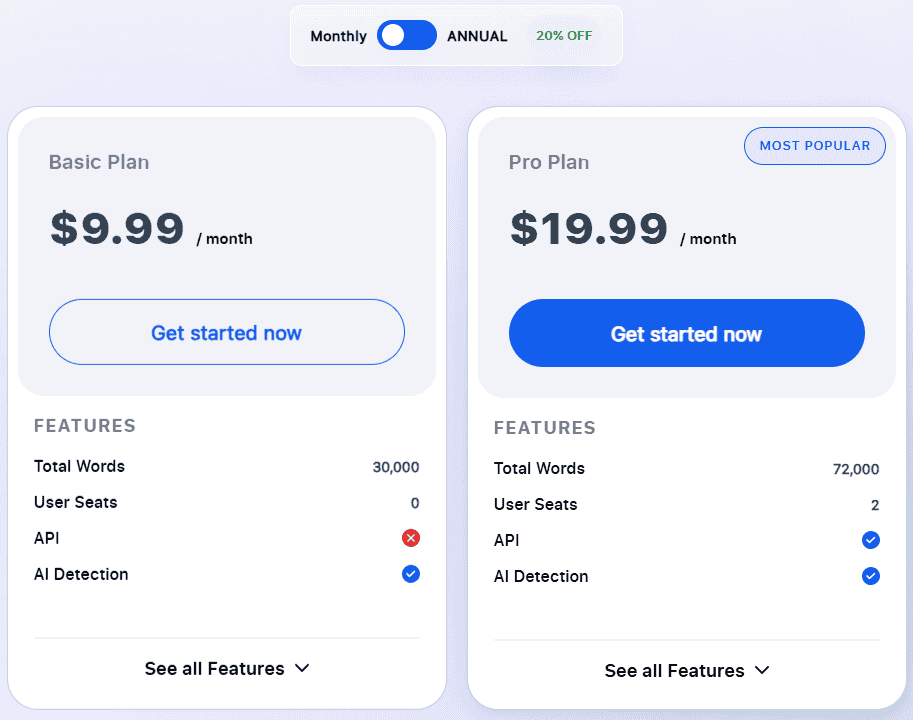
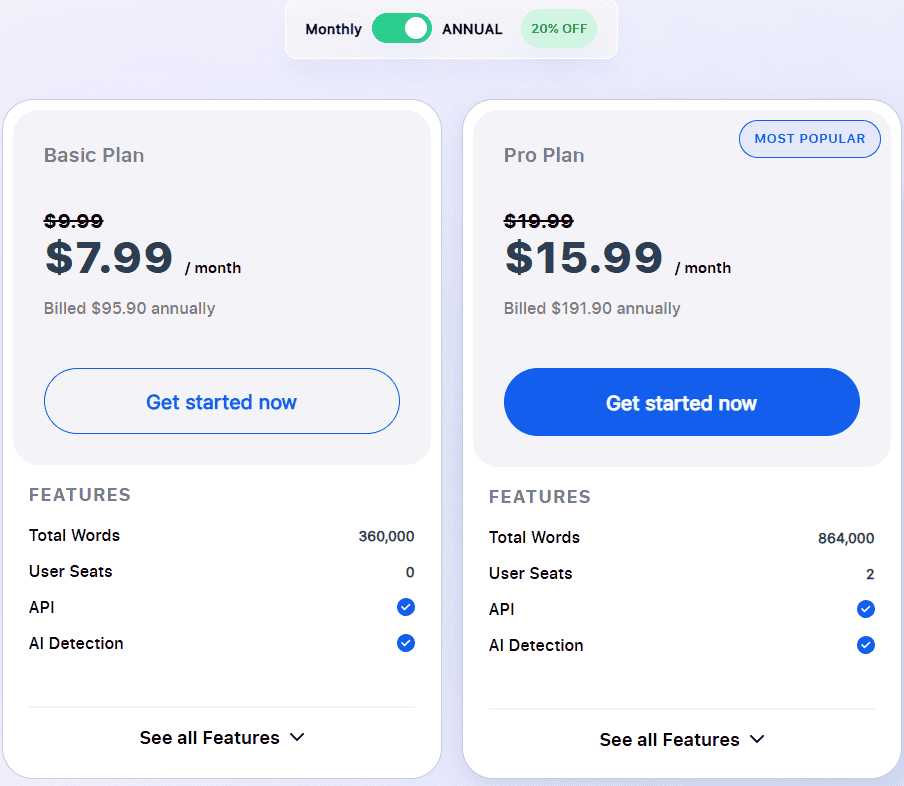
DupliChecker works on a freemium business model. This means that you can use it for free to check the plagiarism of a text of up to 1000 words. However, if you want to integrate this tool’s API into your website or process more than 1000 words in a single attempt, you will have to subscribe to one of these plans:
How to Use DupliChecker’s Plagiarism Checker?
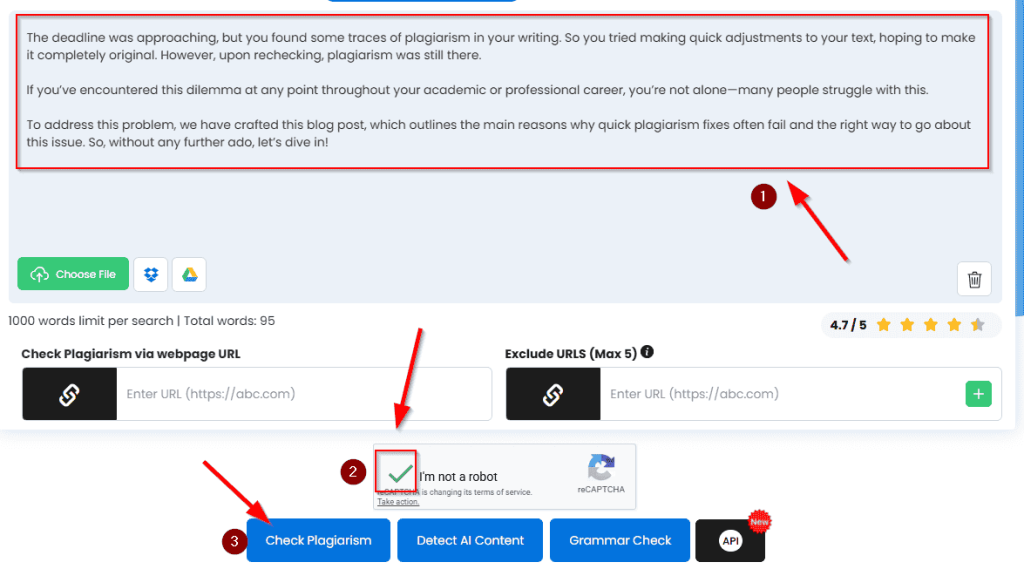
Well, there is not much science or technicalities required to use the plagiarism checker of DupliChecker. You just need to complete the following steps:
- Input your text by copying and pasting it or uploading a file.
- Complete the captcha verification.
- Click the ‘Check Plagiarism’ button.
And that’s it!
Depending on the length of your text, this online utility takes some time to complete the processing. However, once it’s done, you will see an interface like this:
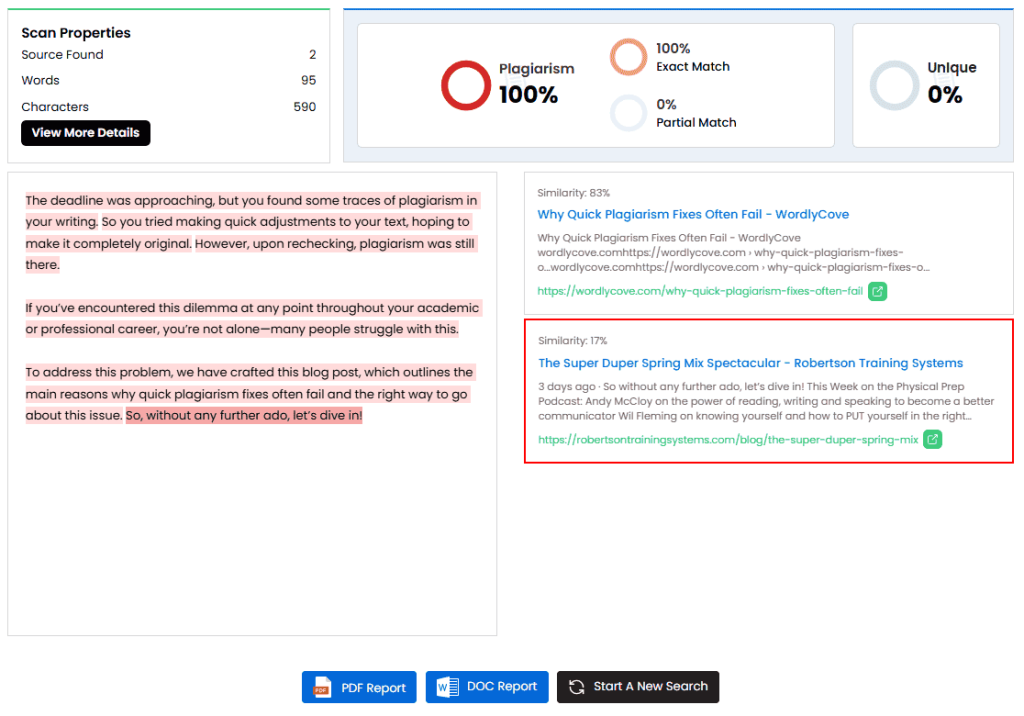
If you want to save this report, just tap the ‘PDF Report’ or ‘DOC Report’ button.
Testing Sample Texts With DupliChecker
Let’s now give you an honest picture of how the plagiarism detector of DupliChecker actually performs.
To do that, I will now run a series of tests using three different types of content:
- A direct copy-paste from WordlyCove.
- A mosaic plagiarism sample where I will blend sentences from multiple sources.
- A paraphrased version of existing online content.
So, let’s see what happens!
Result on Direct Copy-Paste
Here, I will copy the introduction from one of my already-published blog posts. And upon checking its plagiarism, I have got the following result:
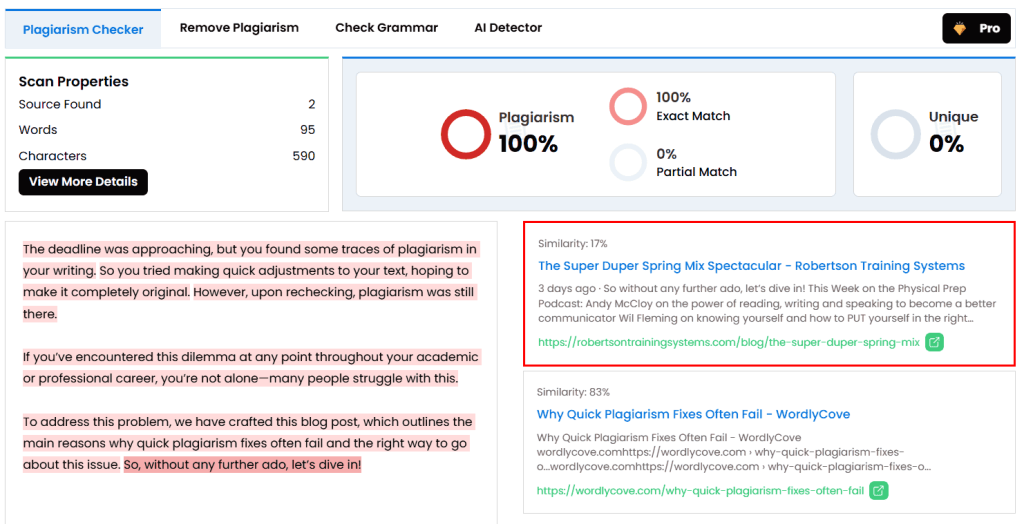
As you can see, DupliChecker showed 100% plagiarism here. So, it works fine for directly copied and pasted texts, and there is nothing unexpected here.
Although one thing that did shock me was its nature of flagging common sentences (So, without any further ado, let’s dive in!) as plagiarized.
Result on Patchwriting
Now, let’s combine information from multiple sources about the ‘AI in Healthcare’ topic. So, this is the sample that I’ve come up with:
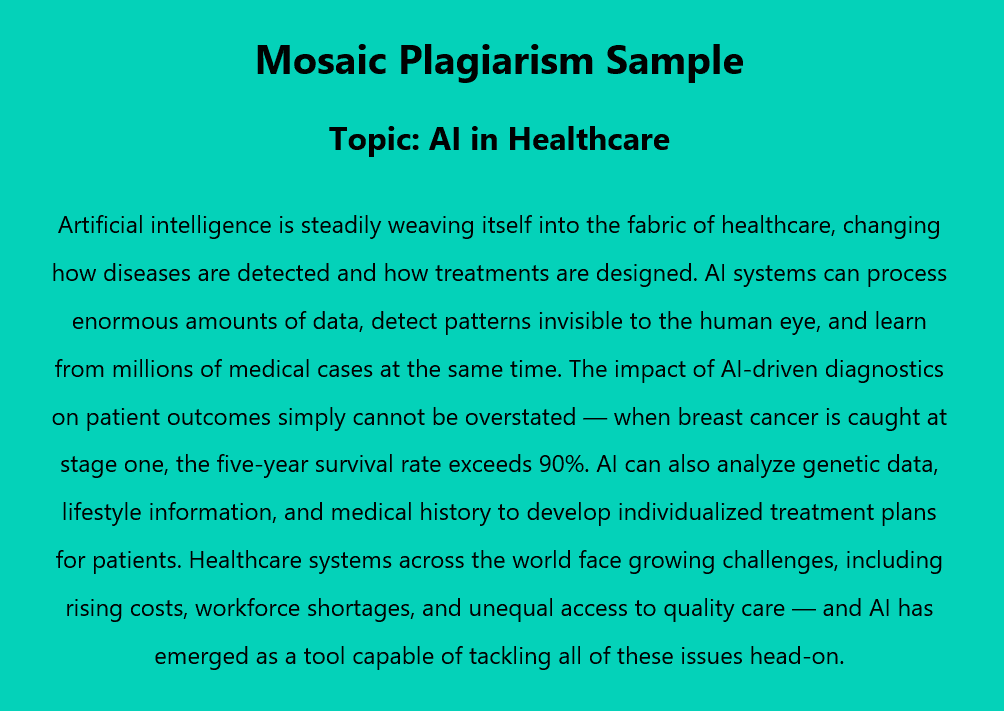
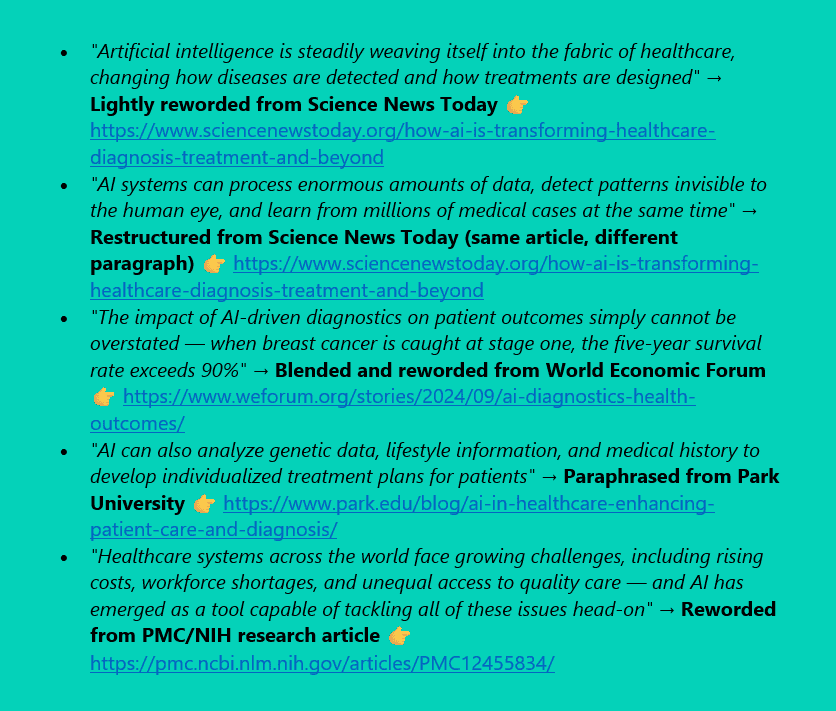
And here are the sources from which I’ve copied this information:
So, upon checking the plagiarism, I’ve got the following output through DupliChecker:
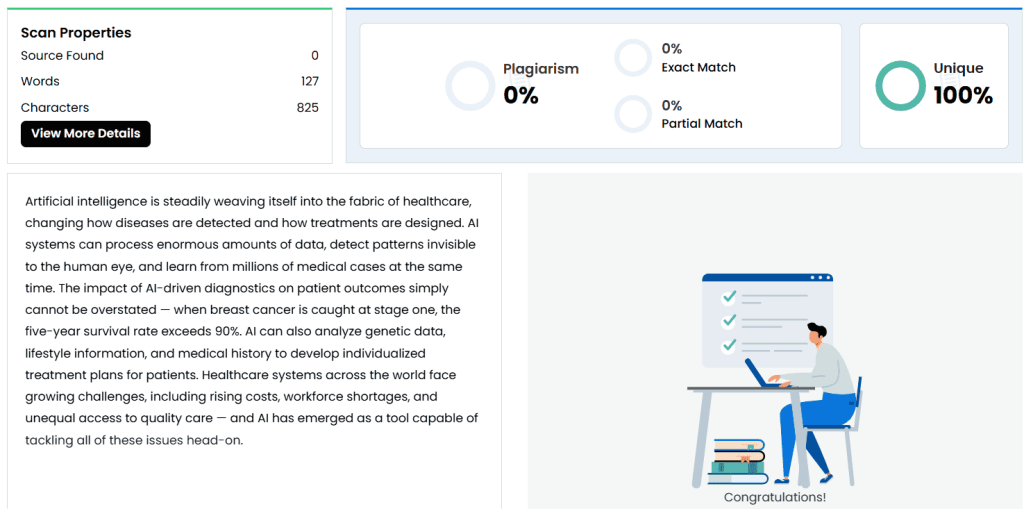
Noticed how slight rewording and rephrasing have made the entire content appear original? However, in reality, I did not double-quote the material and mention the reference. So, this information is still plagiarized.
And that’s an issue with DupliChecker—it can’t detect mosaic plagiarism or patchwriting. This also indicates that the partial match feature doesn’t work accurately.
Result on Paraphrased Text
Now, for the third and final sample, I will paraphrase the text I’ve copied and pasted directly (above). So, upon doing so, I have got the following version:
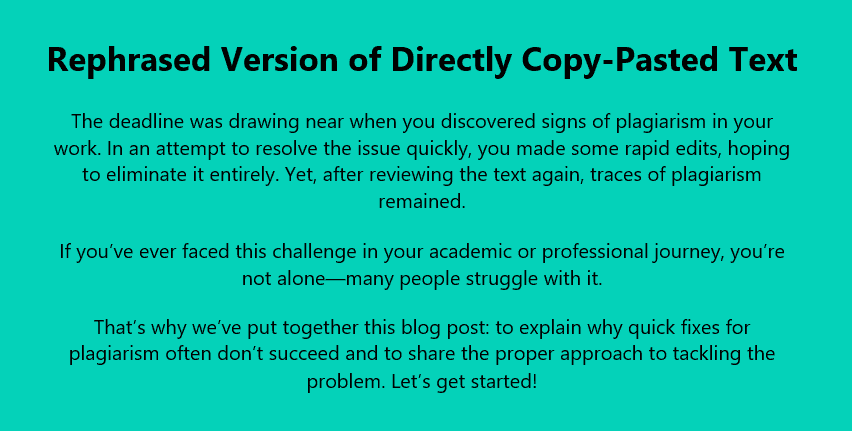
Now, let’s do a plagiarism test on this paraphrased version and see how DupliChecker performs.
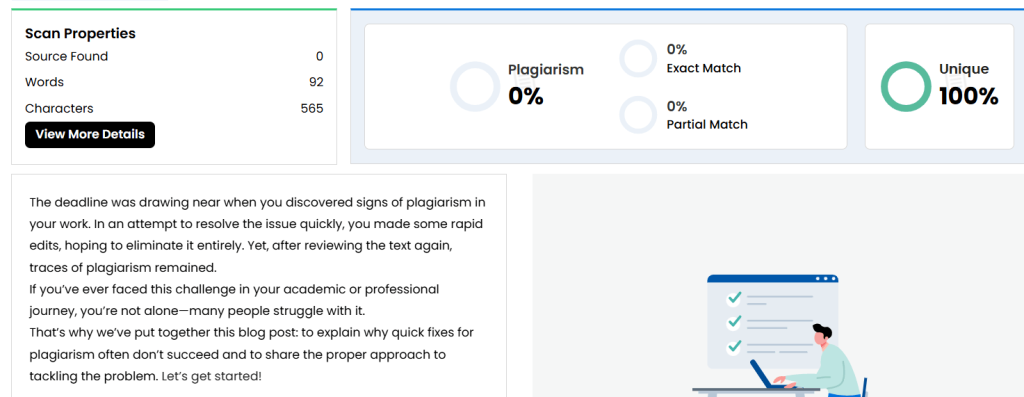
Even though I have not included any references, the rephrased version still turned out to be 100% unique. This means that DupliChecker is also not suitable for paraphrased text.
How Users Rate It on Trustpilot?
User opinions of DupliChecker on Trustpilot are quite varied. For instance, as of now, the platform has a rating of 2.1 out of 5, based on 36 reviews. However, these reviews apply to the entire platform, not just the plagiarism checker.
To give you a clearer idea of what users are actually saying, here are two contrasting reviews about its plagiarism detector:
“I love how DupliChecker’s plagiarism checker lets you download a full report instead of taking screenshots.” — Harry Kash ⭐⭐⭐⭐⭐ — Read on Trustpilot
“It showed my already indexed content as completely unique on another URL, so it’s unreliable.” — Tejas ⭐ — Read on Trustpilot
To be honest, I couldn’t find many negative reviews about the plagiarism checker of DupliChecker on Trustpilot. So, this might be a deciding factor for some of you!
Final Verdict
So, the final word on DupliChecker is a bit of a mixed bag. For instance, on one hand, it does exactly what many users expect from a free plagiarism checker. It can detect direct copy-paste content, offers multiple input options, and even lets you download reports for later use. For quick, surface-level checks, it gets the job done without asking you to pay upfront. But on the other hand, the limitations are hard to ignore. From missing paraphrased and patch-written content to flagging common phrases incorrectly, the accuracy simply isn’t strong enough for serious use cases, especially in academic or professional environments. So, should you use this plagiarism checker? Well, if you just need a quick, basic plagiarism check for direct matches, it’s a good option. But if you’re looking for academic-level checking, deep analysis, or reliable accuracy, this tool might not be the best fit.

