Accurate, deep search, and reliable detection—these are the claims you’ll see on Quetext when exploring its plagiarism checker. But how many of these promises actually hold up under real testing?
Want to find out? Then, stick here!
In this review blog post, we break down exactly how Quetext’s plagiarism checker performs, based on hands-on testing, not marketing copy. So, let’s get rolling!
Things Quetext’s Plagiarism Checker Does Better Than Most
After testing Quetext across different types of content, one thing certainly became clear—this isn’t a perfect plagiarism detector, but it does get several things right, especially at this price point. So, here is a list of what stood out during our testing:
- The DeepSearch™ technology runs your text through contextual analysis and fuzzy matching. This helps it catch some near-identical phrasing that basic string-matching tools may miss.
- Quetext color-codes each match, red for high-confidence exact matches and orange for near-matches. So, you can easily tell which parts of your content need immediate attention and which ones are just borderline similarities.
- When it flags a sentence, you can click on it and see the matched source right there; no need to open another tab and cross-reference manually.
- When something gets flagged, you don’t have to leave the tool and go hunt for citation formats elsewhere. This tool lets you generate APA, Chicago, or MLA citations right from the flagged sentence and insert them directly.
Where Quetext Starts to Lose Points
The consistent use of this online plagiarism checker revealed some downsides as well. They might not be a dealbreaker for everyone, but they’re worth knowing before you commit:
- Even when references were correctly formatted and clearly attributed, Quetext marked them as plagiarized.
- In practice, the free version’s so-called 1000-word limitation gives you just enough to see how the tool works before pushing you toward a paid plan. It’s more of a preview than a functional free tool.
- If you’re on the ‘Essential’ plan and only use 60,000 of your 100,000 monthly words, the remaining 40,000 are simply gone, and you pay the same amount next month regardless.
- In our small test, Quetext caught only around 20-21% of the text that had been rephrased. So, considering that this is a similarity checker, not an academic integrity system, detecting whether ideas were borrowed without citation isn’t really what it has been designed to do.
Quetext’s Pricing Structure — What’s Free and What’s Not
Quetext’s plagiarism checker offers both a free and a paid version. So, it operates on a freemium model. The ‘Free’ plan gives you up to 1,000 words. However, in our testing, after performing two scans of 100-odd words each, the tool started asking for registration before allowing us to continue using it.
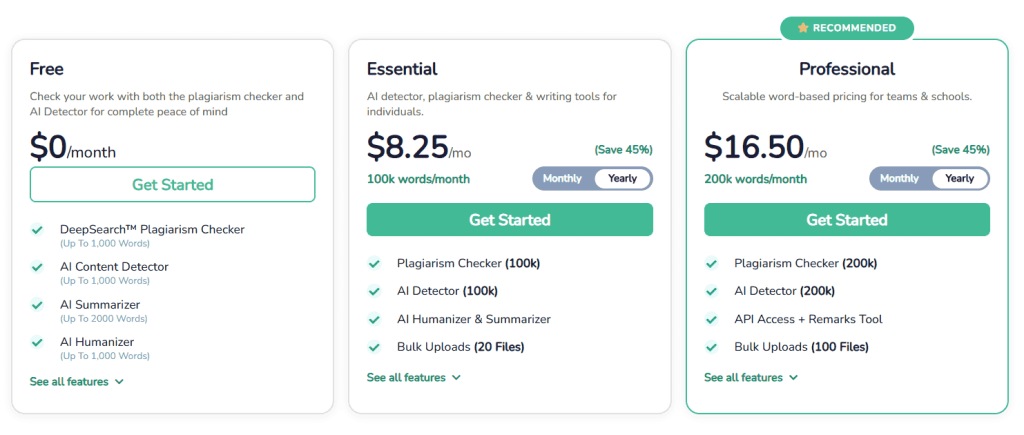
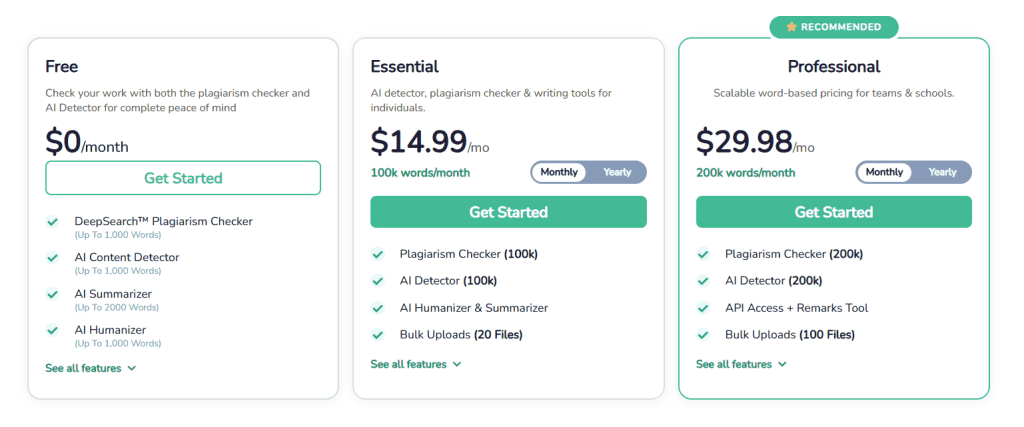
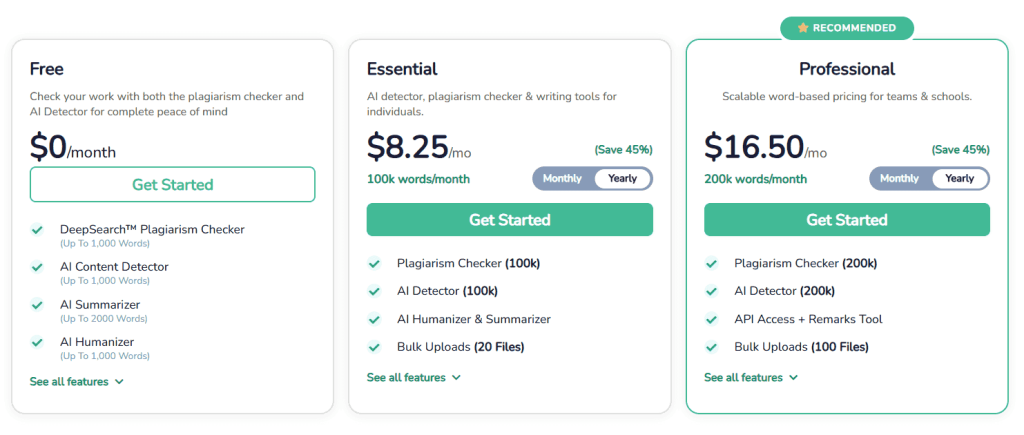
Anyway, when we signed up with the ‘Free’ model, the word count limit remained at ‘1,000,’ reflecting only the unused portion rather than resetting. So, we bought a premium plan, which you can also do by selecting one of these plans and making payments on a monthly or annual basis:
How to Run a Plagiarism Check on Quetext — The Exact Process
Running a plagiarism check on Quetext is about as simple as it gets. There is no complicated setup, no confusing dashboard to figure out, as the tool is built to work right away. Here’s how:
- Type or paste your text directly into the editor. If you’ve signed up with an account, you can also upload a complete document (.docx) file.
- Then, click the ‘RUN PLAGIARISM CHECKER’ button to start the procedure.
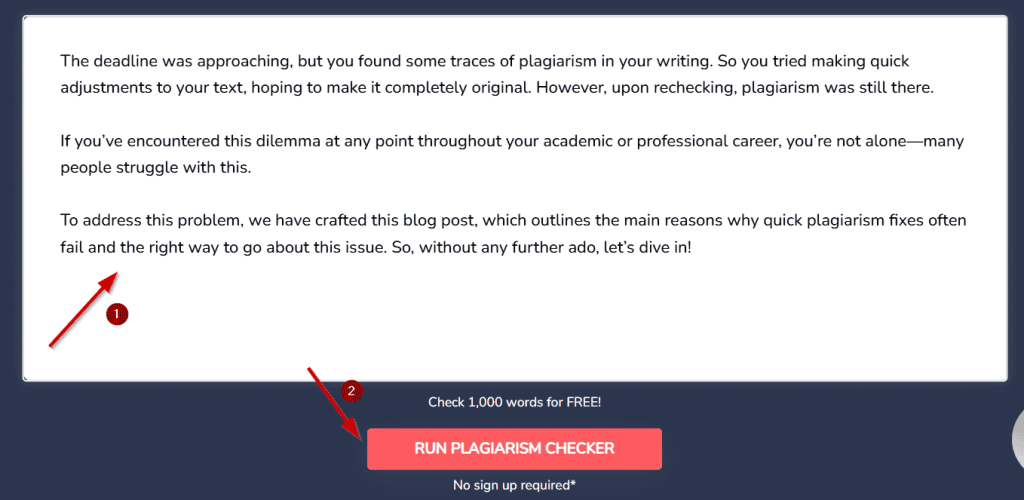
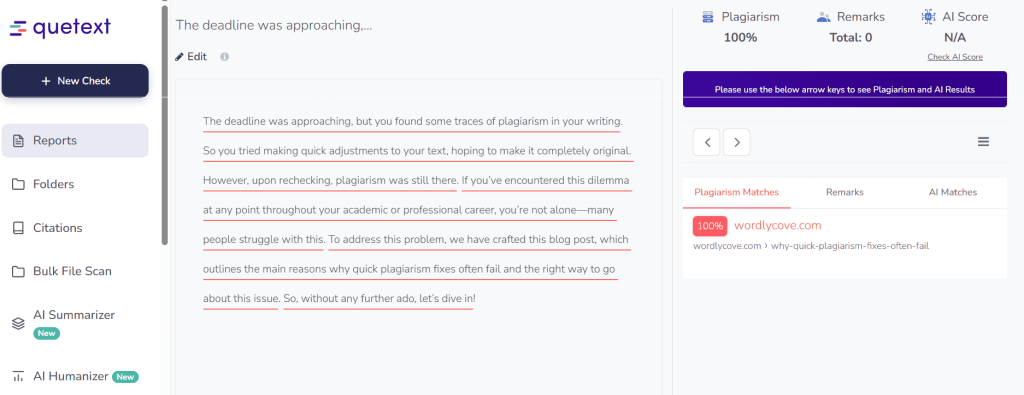
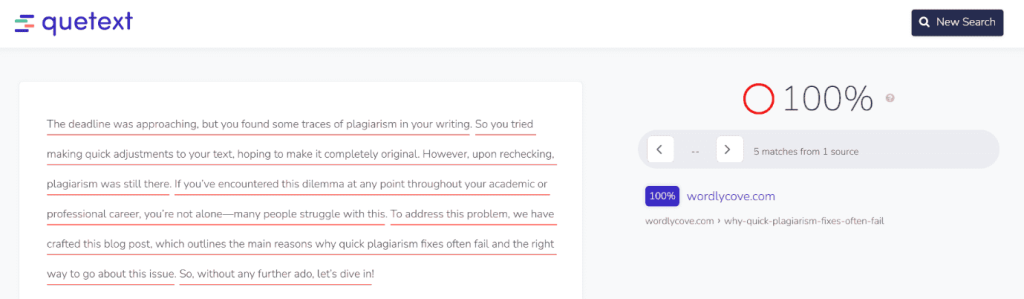
Quetext will take some time to analyze your content through its DeepSearch™ system. But once it has completed the scan, you’ll see the results in one of the following ways:
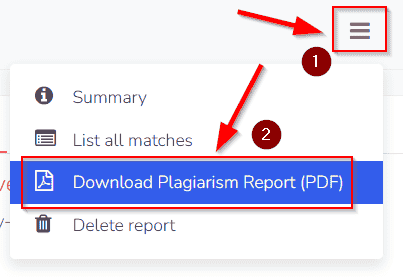
To download your plagiarism report, you should be signed up. Only then will you be able to save your report in PDF format by clicking the hamburger button and selecting the relevant option.
Testing With 3 Different Content Types
Most online plagiarism checkers primarily measure text similarity rather than academic plagiarism. This means that heavily paraphrased content may appear ‘unique’ even if the ideas came from other sources without citation.
So, with that in mind, we wanted to see how Quetext actually performs across different content scenarios—not just the obvious ones. And that’s why we ran three separate tests:
Test 1 — Straight Copy-Paste From a Published Source
For this test, we took a passage directly from one of our already-published blog posts and pasted it into Quetext without changing anything.
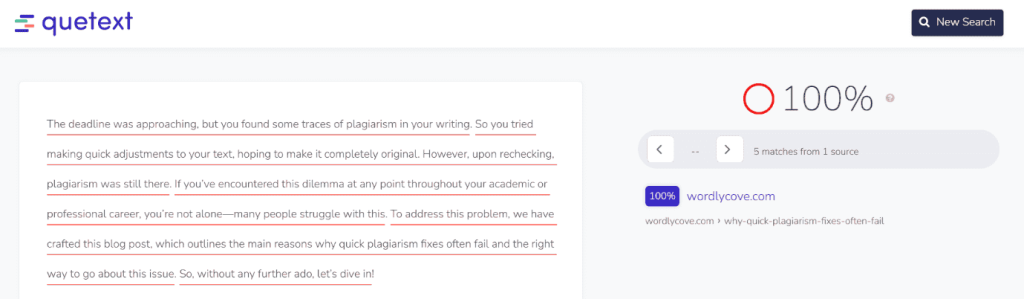
And as you can see, the tool returned a ‘100%’ (plagiarism) score and correctly listed our own website as the source. The flagged sections were color-coded clearly, and the report made it easy to see exactly where the overlap was.
So, for straightforward copy-pasted content, Quetext does exactly what you would expect—no surprises there.
Test 2 — Content Pulled From Multiple Sources, Lightly Edited
For this test, we wrote the following short passage on ‘AI in Healthcare’:
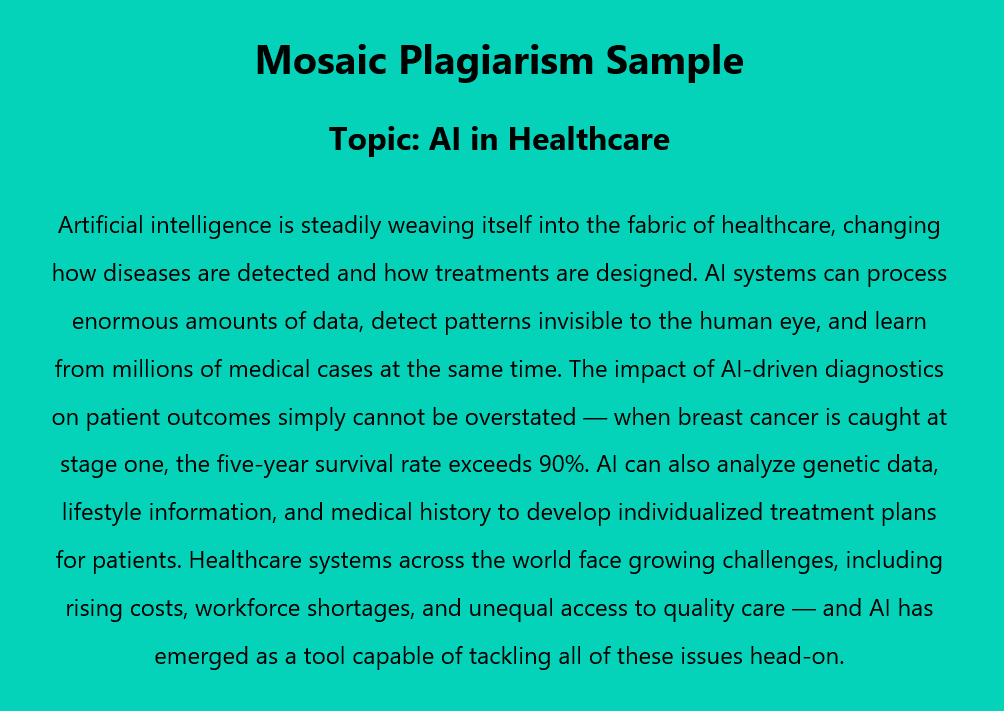
To write this, we combined the information from these five sources and slightly changed the wording:
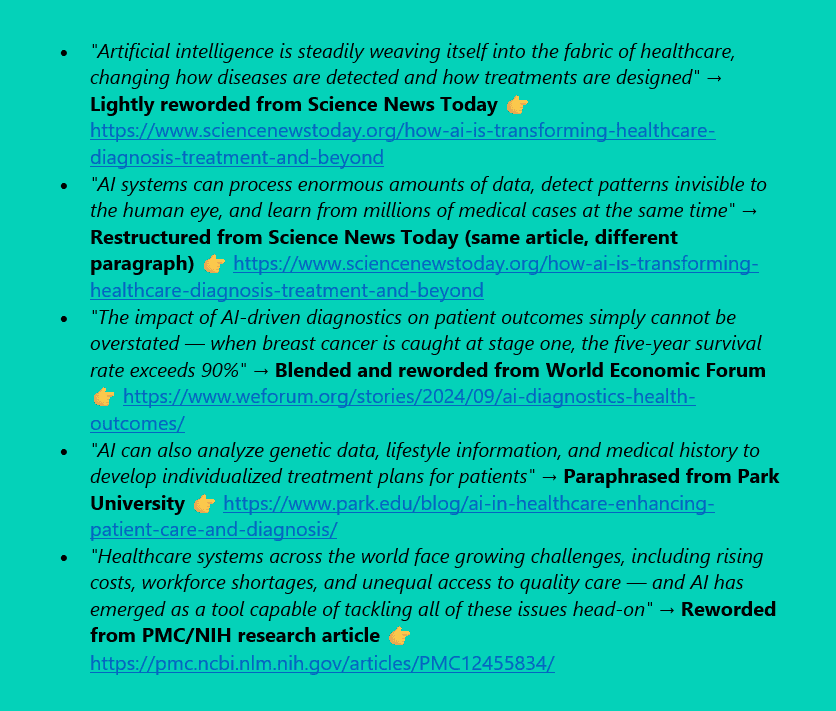
So, here is the result we received from Quetext’s plagiarism detector:
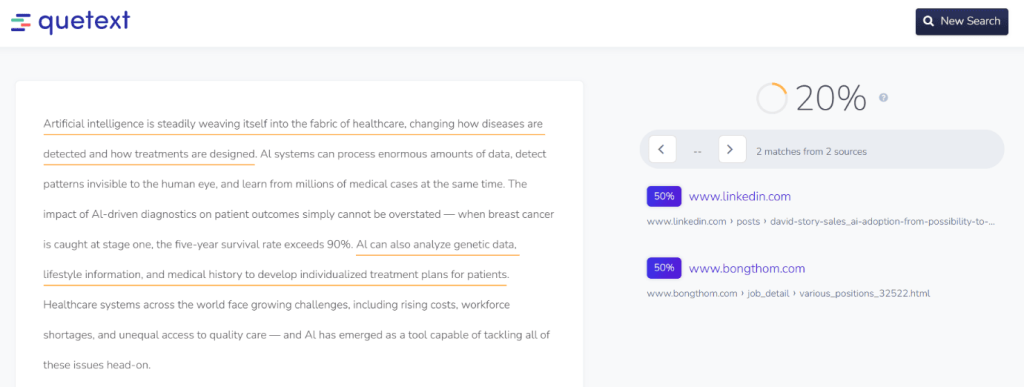
As is obvious, the tool returned a ‘20% near-match score’ and flagged two specific portions:
- The phrase ‘Artificial intelligence is steadily weaving itself into the fabric of’ from the first sentence
and
- The phrase ‘and medical history to develop individualized treatment plans’ is from the fourth sentence.
But here is the interesting part:
The sources that Quetext listed weren’t the ones we had actually pulled the content from.
So, while this web utility did pick up on some surface-level similarity, it wasn’t pointing to the right origins in our testing. And this highlights a limitation that the tool may flag portions of the text when dealing with lightly edited or patch-written content, but the source attribution wasn’t always accurate, at least not in our testing.
And again, since Quetext measures text similarity rather than academic plagiarism, such tools have not been designed to determine whether underlying ideas came from uncited sources.
Test 3 — A Fully Paraphrased Version With No References Added
For the final test, we took the same passage from Test 1 and rephrased it completely—same meaning, entirely different wording. Here’s how:
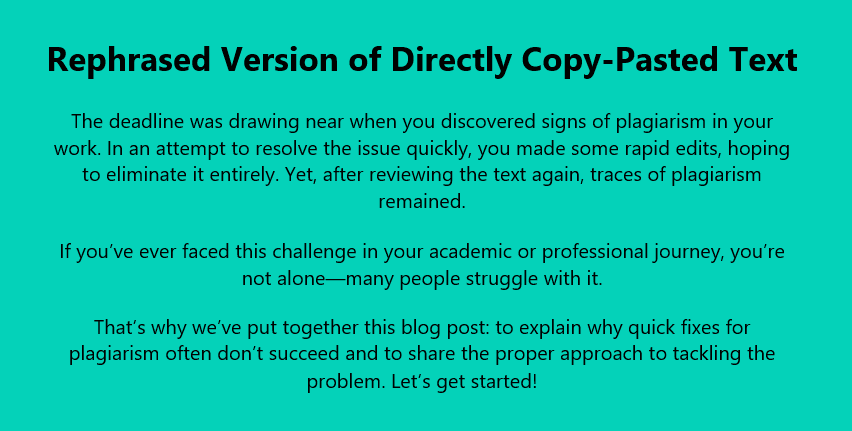
So, upon submitting this fully paraphrased version without adding any citations, we got the following result from Quetext:
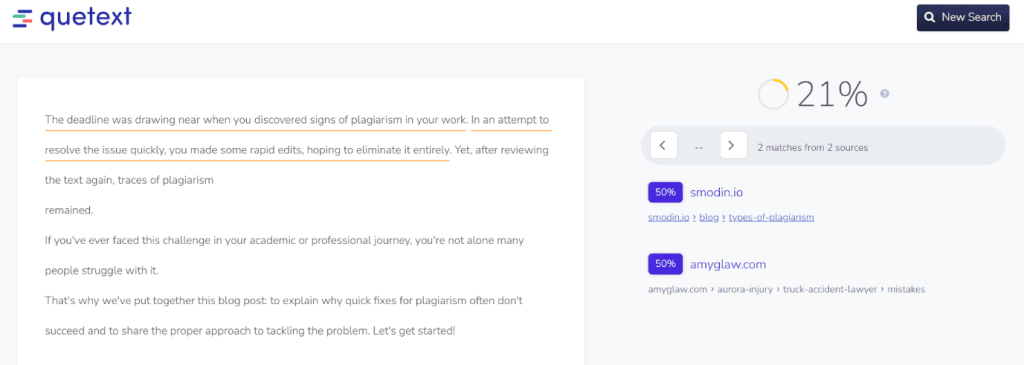
As you can see, here, this plagiarism checker returned a ‘21% near-match score’ and flagged the following two sections:
- The phrase ‘signs of plagiarism in your work’ from the first sentence
and
- The phrase ‘In an attempt to resolve the issue quickly’ from the second sentence
But again, the listed sources were not where we got the inspiration for this content; they belonged to completely different websites.
Now, here is the interesting part:
Both of the flagged phrases (in this case) are fairly common in everyday writing.
So, the match here is most likely coincidental rather than a genuine similarity. And this is a good example of a false positive, where a tool, plagiarism checker in this case, flags language that happens to appear elsewhere online, even though it wasn’t actually borrowed from that source. And this is something to keep in mind when reviewing Quetext’s reports:
Not every flagged match is a real problem, and the sources listed don’t always reflect where your content actually came from.
So, this online tool does not appear to evaluate whether rewritten text includes proper citations. And that is why a paraphrased passage without attribution may not be flagged here either, which is worth considering when preparing academic or professional work that requires proper citation.
What People Are Saying on Trustpilot — Real User Opinions
To balance hands-on testing with real user feedback, we also looked at Quetext’s reviews on Trustpilot. So, at the time of testing this tool and documenting this review, Quetext holds a 4.5-star rating based on 153 reviews, with 78% being five-star and 15% being one-star.
This means that the experiences are fairly divided.
For instance, most of the positive reviews come from students and academics who found it genuinely useful for serious work, while the negative ones tend to focus on billing frustrations and occasional accuracy issues. So, here are two reviews that represent both sides fairly:
⭐⭐⭐⭐⭐ Star Light (Sumari (M.S.) Gildenhuys)— “Quetext made my 499‑page PhD dissertation possible with stellar support and an excellent product, it’s a tool I’ll recommend and return to again…” — Read on Trustpilot
⭐ UserOOOOOl— “Quetext’s ‘free’plagiarism checker felt like a bait‑and‑switch—you have to sign up, and there’s no real usable free option…” — Read on Trustpilot
The Final Verdict — Is Quetext Worth Using or Not?
All in all, Quetext is a solid plagiarism checker, but only if you understand what it has actually been designed to do. For instance, based on our testing, it performs well when it comes to ‘detecting direct matches and highlighting surface-level similarities.’ The interface is clean, the reports are easy to follow, and features like DeepSearch™, color-coded results, and built-in citation generation genuinely make the tool convenient to use.
However, as seen in the tests, ‘lightly edited or fully paraphrased content often appears mostly unique,’ and the sources it highlights aren’t always the ones the content was originally based on. This isn’t necessarily a flaw, but it simply reflects how similarity-based tools usually work.
Thus, simply put, Quetext works best as a first-level plagiarism checker, not a complete academic integrity solution. And as long as you use it with that expectation in mind, it can still be a useful addition to your workflow.

WordlyCove is a peaceful space where words, writing, and knowledge come together, an ideal platform for writers and learners.
