PlagiarismChecker.ai looks like a solid tool at first. For instance, it is clean, easy to use, and promises accurate AI-powered plagiarism detection. So, on paper, this web utility ticks all the boxes. Right?
But tools like this often look better than they actually perform because when you start testing them with real content, not just simple copy-paste, you begin to see several gaps, such as false positives, missed detections, and results that don’t always add up.
Therefore, instead of relying on claims, we’ve decided to test PlagiarismChecker.ai ourselves. And in this blog post, we’ll show you exactly what happened when we put this plagiarism checker through real-world scenarios.
So, keep reading to find out whether it’s actually worth using or not!
What PlagiarismChecker.ai Does Well
After using PlagiarismChecker.ai for a while, we’ve found that this tool is not overloaded with features. But it does what most users expect, and that too without making things complicated:
- This web utility does a reasonable job with direct copy-paste content. For instance, when we tested it with fully duplicated text, it picked up 90% of the matches clearly and linked them to the original sources.
- The report layout is simple and easy to follow. You can quickly understand what’s matched and where it’s coming from without second-guessing the results.
- This tool offers multiple ways to check content, including pasting text, uploading files, or scanning a URL, which makes it flexible depending on how you work.
- PlagiarismChecker.ai feels quick and responsive. Even with longer inputs (within limits), the results don’t take much time to load.
Where PlagiarismChecker.ai Struggles
Once we moved beyond basic checks, a few limitations started to show up. Although these aren’t uncommon in free or mid-range tools, they’re still worth keeping in mind. So, here is a list of them:
- The free version’s (1000) word limit can feel restrictive if you’re working on full-length articles or detailed pieces.
- The results are mostly surface-level. You get percentages and sources, but not much depth in terms of how or why something is flagged.
- Unlike DupliChecker, the tool does flag partial matches. However, when we checked the listed sources, the text didn’t appear partially matched at all—it was completely different. So, the ‘partial match’ feature seemed quite harsh.
- When we paraphrased text without adding citations, the tool treated it as original, even though there were no citations.
Is PlagiarismChecker.ai Free or Paid? — What Do You Really Get?
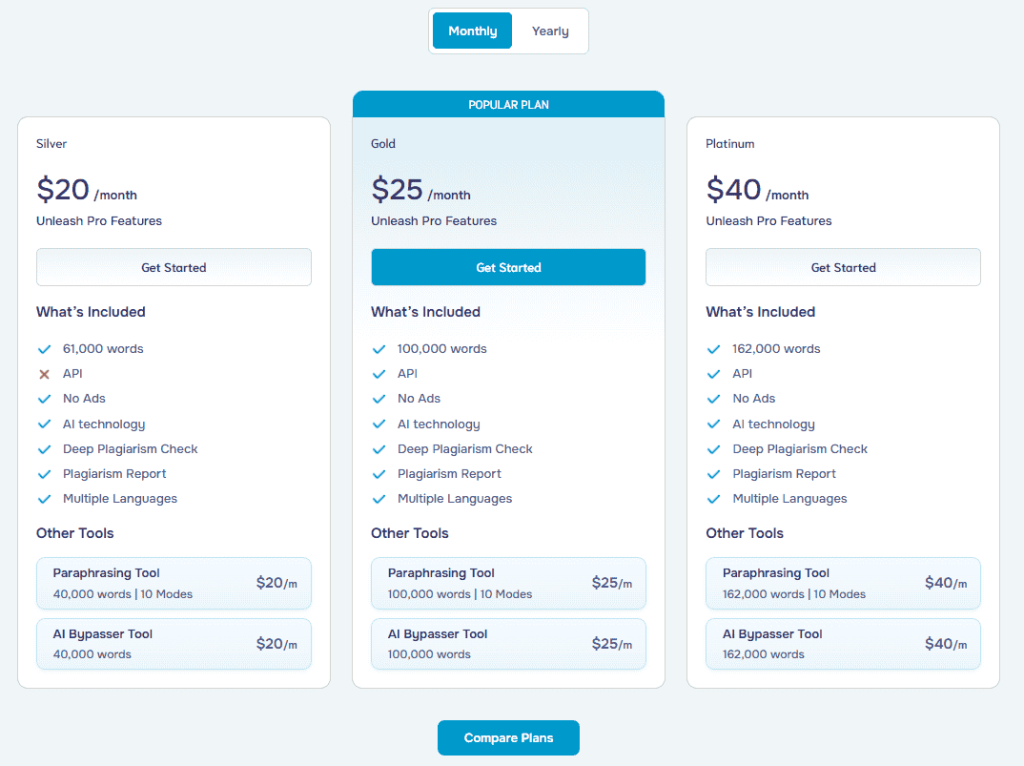
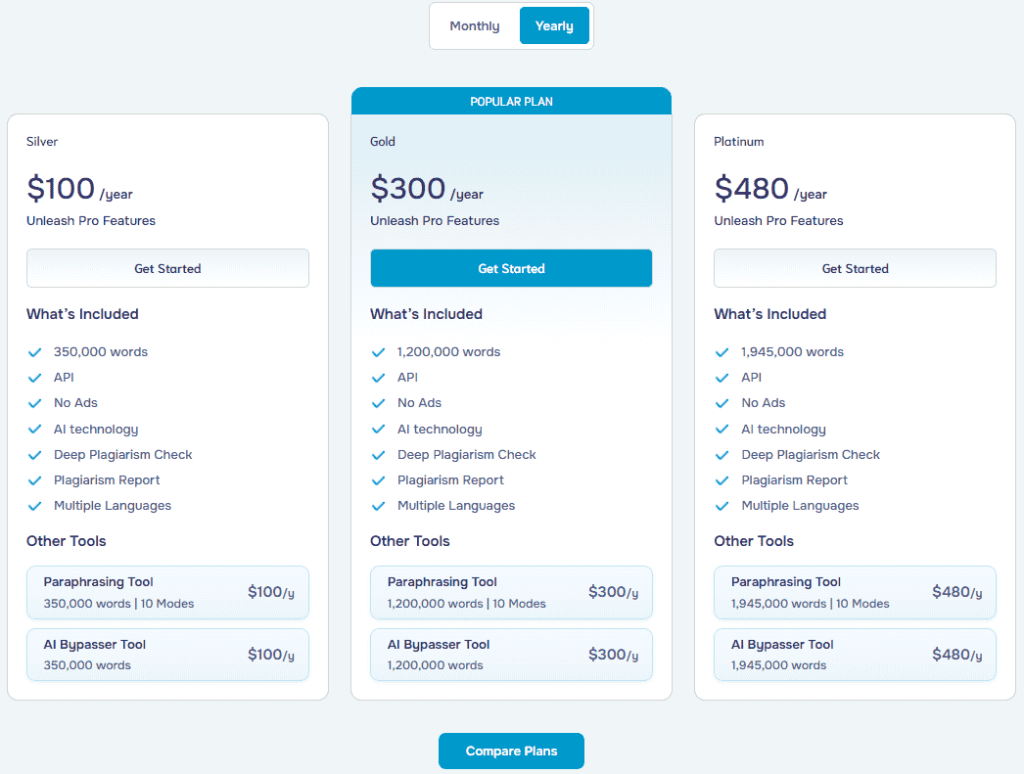
PlagiarismChecker.ai offers a free version, but it comes with a 1000-word limit, which is fine for short checks but may not be ideal for longer content. So, if you want to scan larger pieces, you’ll need to move to a paid plan.
The pictures below provide a quick rundown of its pricing structure, with both monthly and yearly payment plans:
How to Use PlagiarismChecker.ai to Check Plagiarism
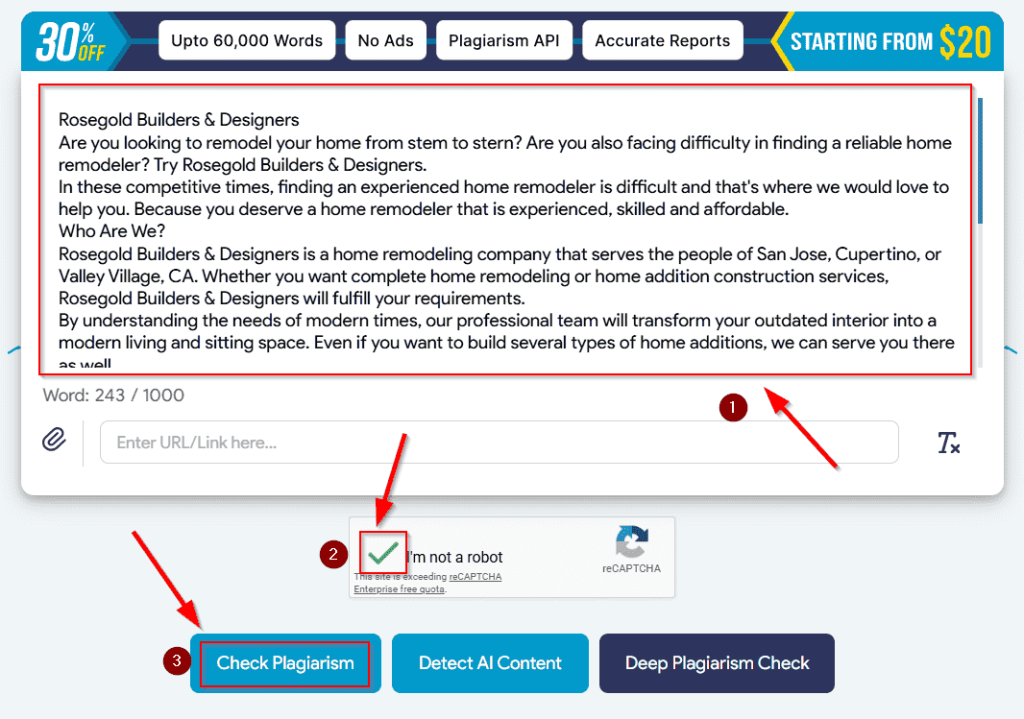
From our experience, detecting plagiarism with PlagiarismChecker.ai is really simple. We didn’t need to set anything up or go through a complicated process. We just followed the following simple procedure:
- Add text by pasting into the editor, uploading a file, or entering a URL.
- Complete the verification step if prompted—you definitely will if you’re on the free plan.
- Click on the ‘Check Plagiarism’ button, and wait a few moments while the tool processes the entered text.
Once the scan is complete, you will see the results in the following way:
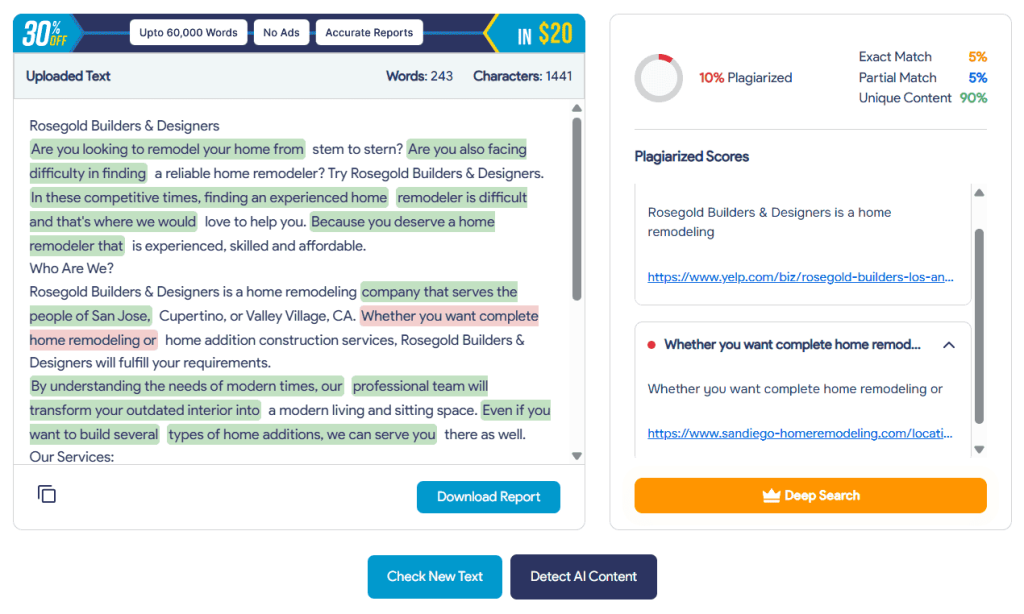
So, go through the report to see which parts of your content overlap with existing sources. And if you want to save it, just hit the ‘Download Report’ button, which will prompt the tool to export the result in a PDF form. And that’s pretty much it!
How I Tested PlagiarismChecker.ai
Note: It’s important to understand that most online plagiarism checkers measure text similarity, not academic plagiarism. This means heavily paraphrased content may appear ‘unique’ even if the ideas came from other sources without citation.
So far, you may have started to understand what this plagiarism checker can actually do. Right? However, that is insufficient to make a final decision.
So, to give you a clear picture of how accurate this tool actually is, we tested it using different scenarios that reflect how plagiarism usually appears in real content. This included:
- Combining information from different sources, with minor changes.
- Direct copying.
- Rewriting existing material without adding references.
That’s because we want to see how the tool performs in both obvious and less obvious scenarios. So, let’s see how PlagiarismChecker.ai actually did in our testing phase:
Test 1: Direct Copy-Paste Content
For this test, we selected a small text passage from our previously published content and pasted it into this web utility without making any changes. And here is the result:
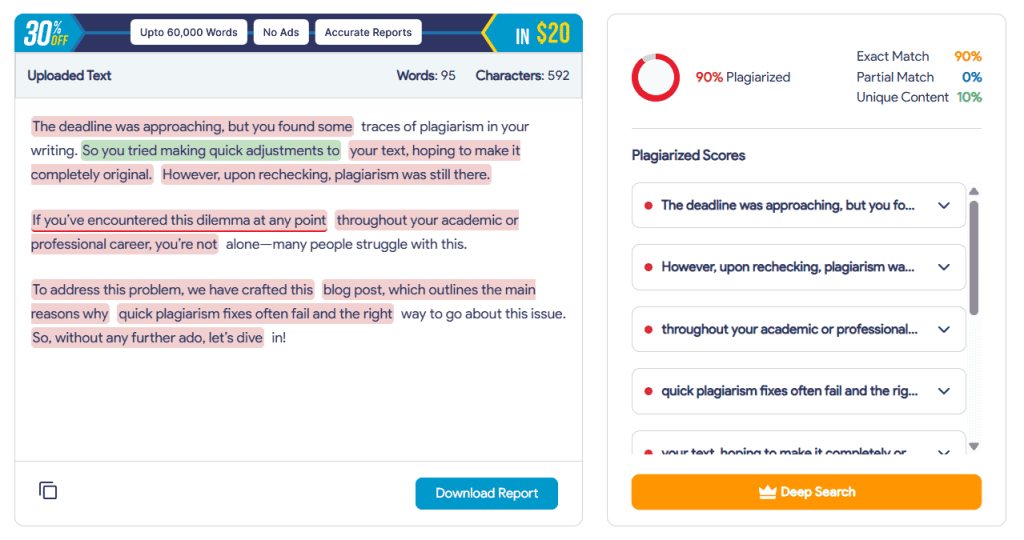
As you can see, PlagiarismChecker.ai has easily detected the copied text and showed a high match percentage along with the relevant sources. So, for direct duplication, this online tool doesn’t miss obvious matches.
However, even though the text was fully copied, the score wasn’t a perfect 100%, likely due to filtering of short or common phrases and internal scoring thresholds. So, that’s a minor issue we noticed with directly copied and pasted content.
Test 2: Content Combined from Multiple Sources
Next, we wrote the following text sample:
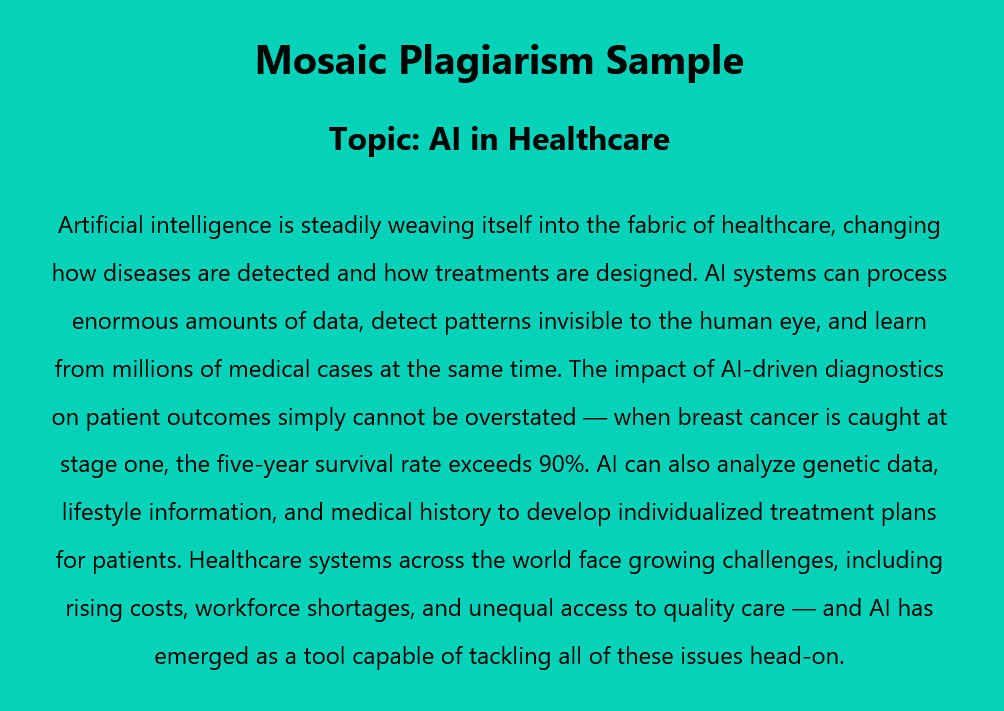
For this case, we pulled information from the following sources and slightly adjusted the wording:
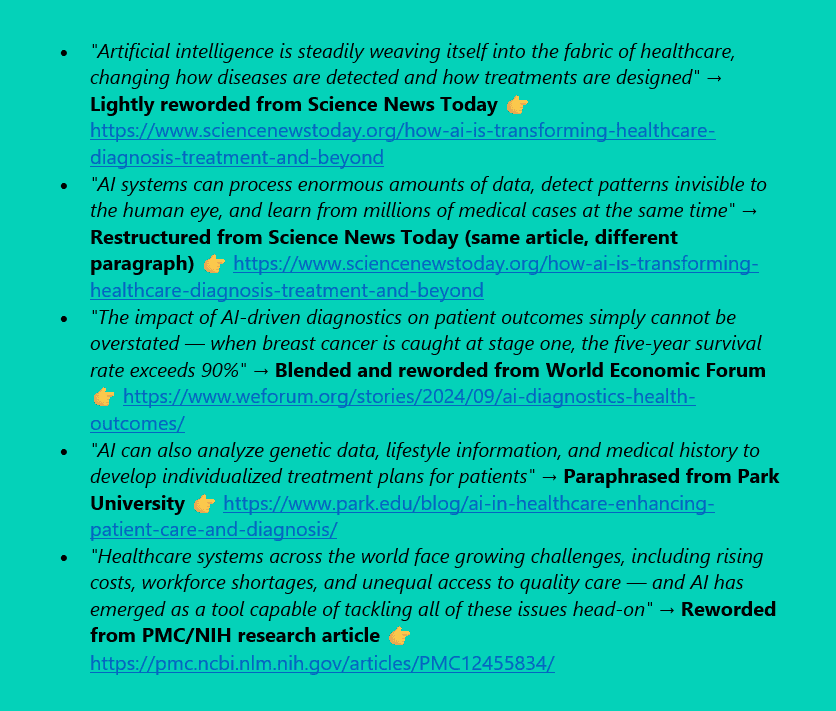
Here, the structure and ideas were still based on existing content, but not copied word-for-word. So, this is the result that we got:
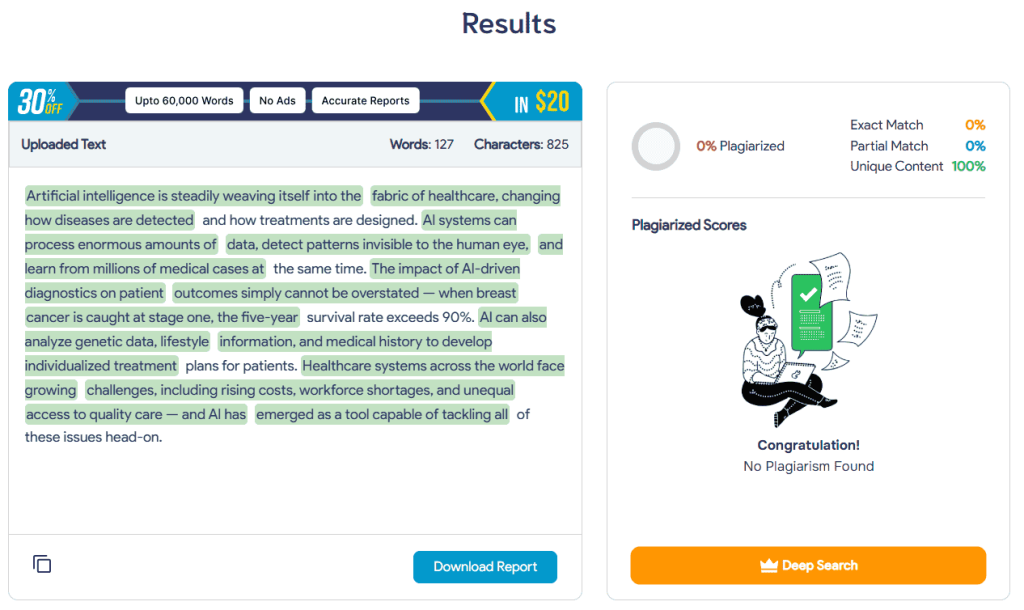
As you can see, the result was completely unreliable here—the tool is claiming that the entire text is 100% unique. This means that the tool struggles to detect content that has been lightly rewritten or combined from multiple sources.
Test 3: Rewritten Content (Paraphrasing Test)
For the final test, we fully rewrote the text passage used in ‘Test 1.’ The meaning stayed the same, but the wording was changed throughout. Plus, we haven’t added any sources.
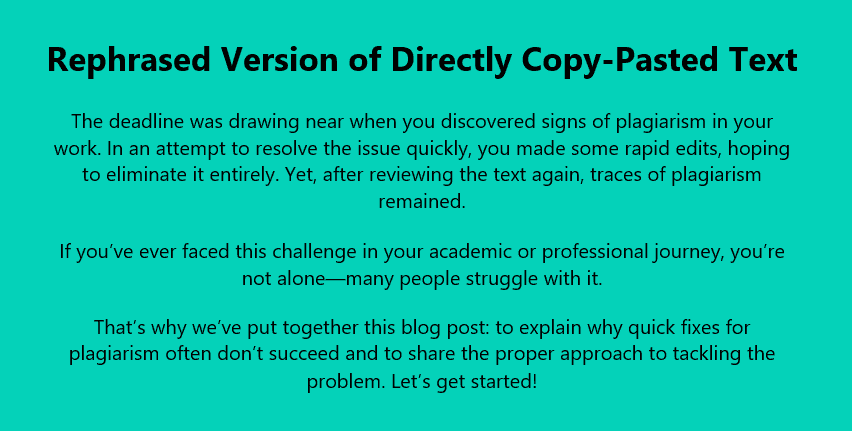
And in this case, PlagiarismChecker.ai marked the text as ‘89% unique’:
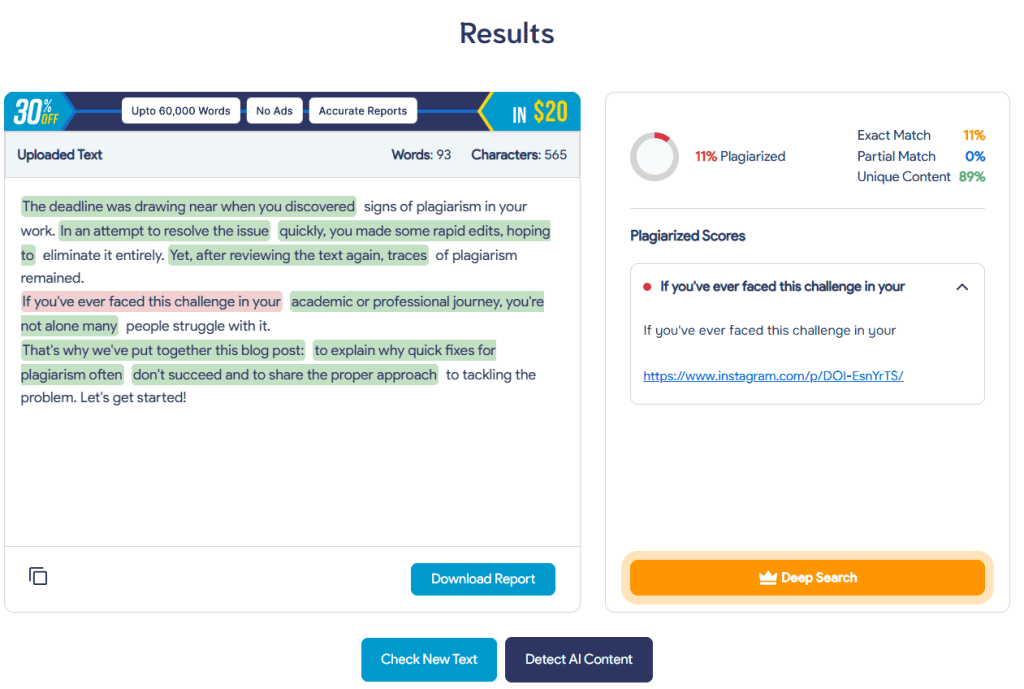
Now, it’s true that the rephrased version looks completely different from the source. However, it doesn’t contain any citations. So, while the text appears unique from a similarity perspective, the tool does not evaluate whether citations are missing—something typically handled by academic systems like Turnitin.
Plus, PlagiarismChecker.ai has marked a common phrase as ‘plagiarized.’ So, this could lead to false positives when checking large amounts of text, especially due to common phrases.
So, Is PlagiarismChecker.ai Worth Using?
If your goal is to catch direct copy-paste content quickly, then yes—this tool can be useful. It is simple to use, gives fast results, and highlights obvious matches with source links. For basic checks, especially on shorter pieces of content, it does the job without adding unnecessary complexity.
However, once you move beyond that, the limitations become hard to ignore.
The tool struggles with slightly modified or mixed-source content, and it doesn’t reliably detect paraphrased material without citations. On top of that, issues like inaccurate match percentages, overly strict ‘partial match’ flags, and marking common phrases as plagiarized can make the results feel inconsistent.
So, if you need deeper analysis for academic writing, research, or professional publishing, this tool may not be sufficient on its own.

